

Modernizing a Legacy Application Without Stopping the Business
Some applications are too important to stop. They run payroll, purchasing, budgets or inventory for an entire organization, and they have been doing it for ten or fifteen years. They were built with the frameworks that made sense at the time, and every year that goes by makes them harder to maintain, harder to secure and harder to find people who want to work on them.
The tempting answer is to rewrite everything from scratch. In our experience, that is rarely the right one. A full rewrite freezes the old system while the new one is being built, doubles the work for years, and bets everything on a single switch-over day. The business, meanwhile, keeps asking for changes.
At Flowing Code we have modernized several large applications without stopping them. In this article I want to share the approach we follow, based on two ERP migrations that took years and are still delivering value every day.
Two Projects, One Approach
The first case is an ERP for government entities: a very large application built over the years on old versions of several frameworks. The second is another large ERP, a migration we started several years ago and that is still evolving today.
The two projects had different starting points, different teams and different constraints. But looking back, the path we followed was remarkably similar. It can be summed up in one idea: never break what works, and make every step small enough to be tested and reversed.
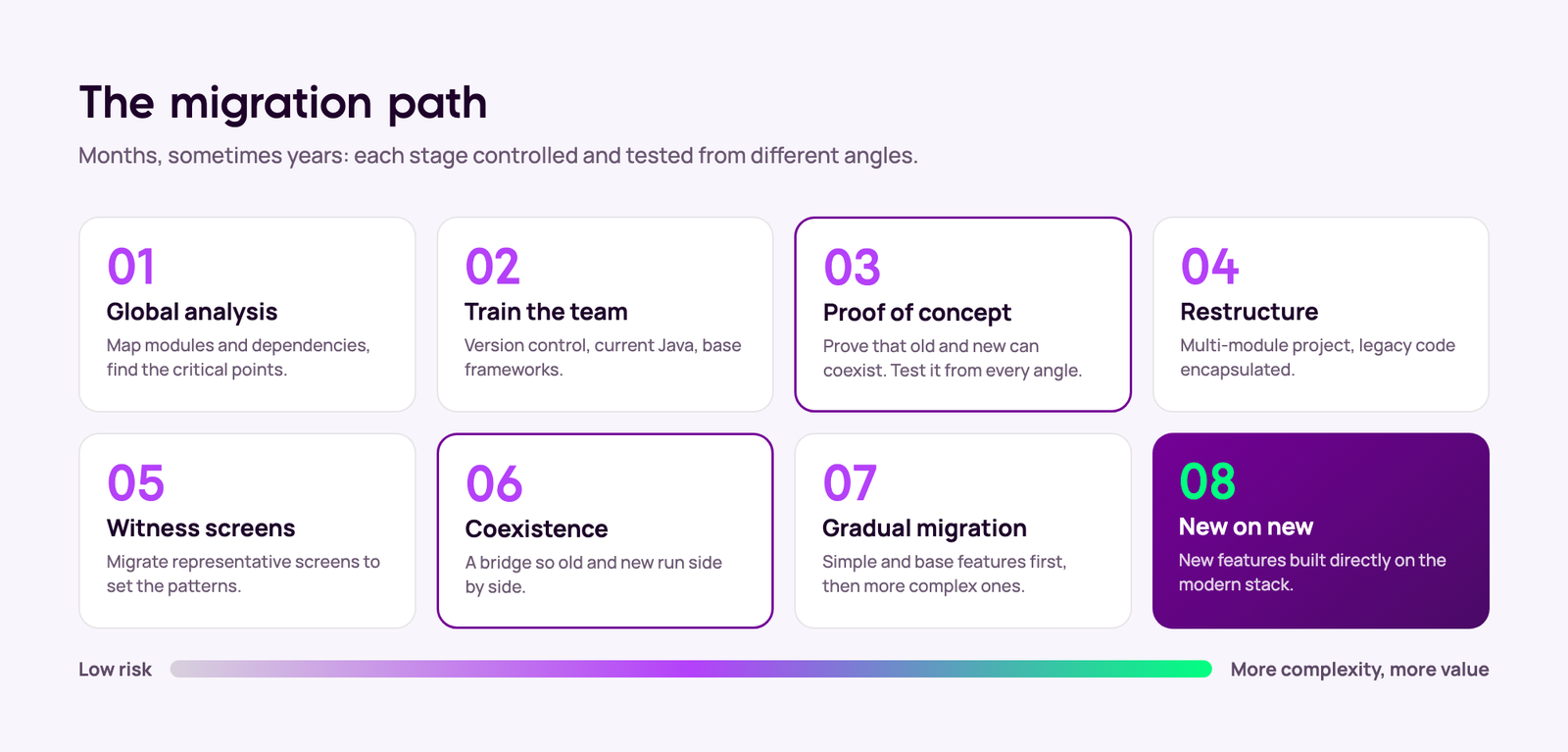
1. Start With a Global Analysis
Before touching any code, we need to understand the whole system: its modules, how they depend on each other, which frameworks and versions each part uses, how it is built and deployed, and who knows what.
The goal is to find the critical points: the obsolete libraries that block upgrades, the parts that concentrate most of the business logic, the areas with security or performance problems, and the knowledge that lives only in a couple of people's heads. This map is what lets us plan the migration in stages instead of guessing.
2. Invest in the People First
In the second project we did something before designing anything: we trained the client's team. Version control, current Java versions, modern build tools and the frameworks we were going to use.
It may look like a detour, but it is what makes a migration sustainable. The new stack will be maintained by the people who work on it every day. If they don't master it, the modernization ends when the consultants leave. A team that understands the new tools also becomes an active part of the design, instead of a group that receives changes it doesn't fully understand.
3. Prove That Old and New Can Coexist
The core risk of a gradual migration is coexistence: can the old and new technologies run inside the same application, share the session, navigate between each other and look like a single product to the user?
So we build a proof of concept and we test it from every angle: functionality, performance, security, build and deployment. In the first project, the proof of concept showed how the different technologies could live together. In the second one, it went further: we rewrote the application's shell (login, navigation and layout) using modern technologies, and built a bridge from the new shell to the legacy screens.
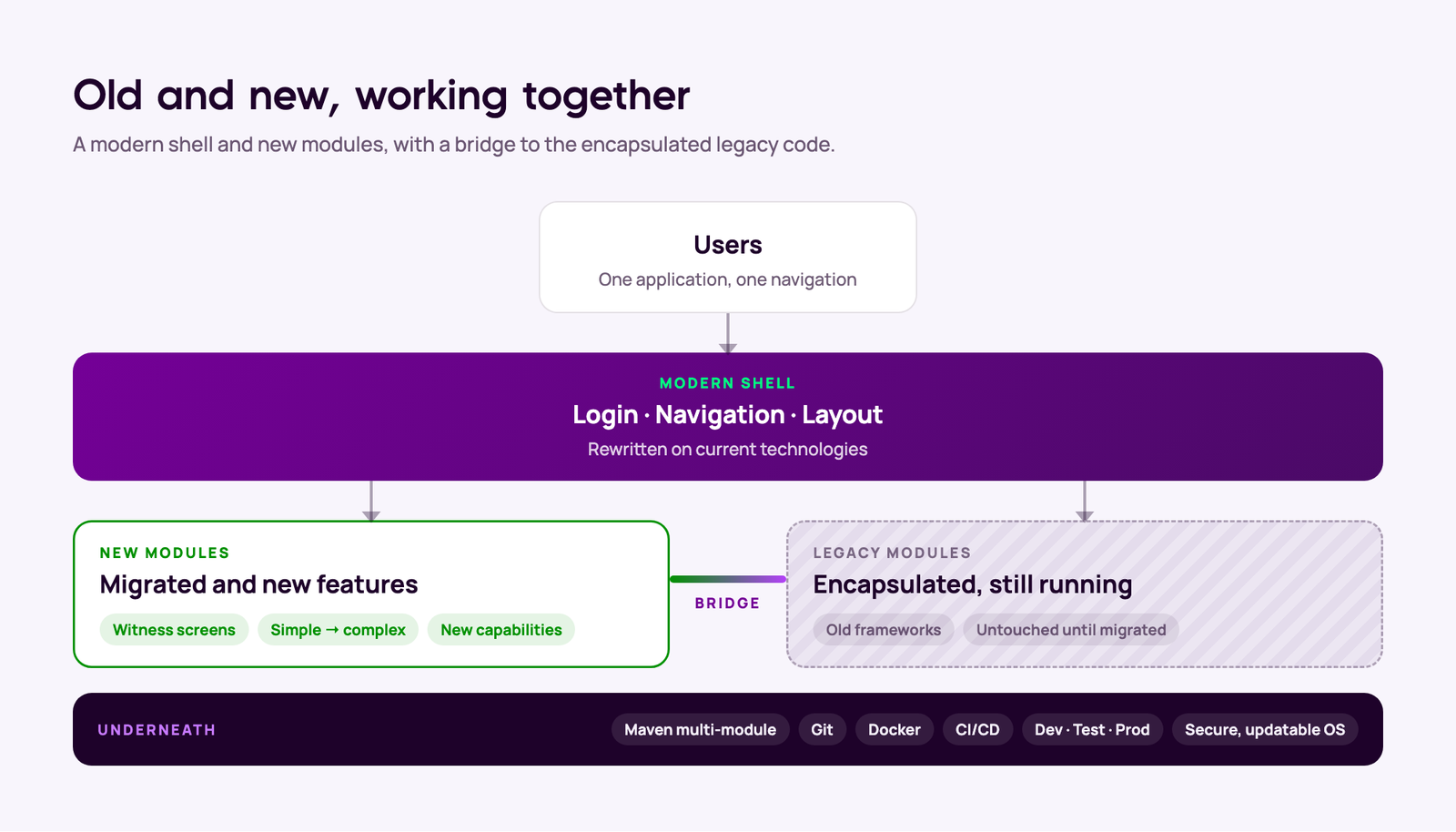
That bridge is the piece that makes everything else possible. From that moment on, users work in a single application, while each screen can be migrated whenever it is ready.
4. Restructure the Project and Encapsulate the Legacy Code
Large legacy applications are often a single huge project where everything can see everything else. One of the first technical steps is to turn it into a Maven multi-module project, with clear boundaries between the parts.
The legacy code goes into its own modules, encapsulated: it keeps running exactly as before, but the new code depends on it only through well-defined points. This reduces the risk of every change and makes it possible to upgrade or replace each piece independently.
5. Migrate the Witness Screens
Before migrating at scale, we pick a few witness screens: representative screens that cover the typical patterns of the application, such as a list with filters, a complex form or a report.
Migrating them first validates the architecture with real cases, defines the patterns and reusable components that the rest of the migration will follow, and gives us a realistic estimate of the effort, based on actual work instead of guesses.
6. Define the Path and Migrate Gradually
With coexistence solved and the patterns defined, we agree on a migration path with the client and start the gradual migration.
We begin with the simpler, foundational features, the ones that many other parts depend on, and then increase complexity iteration by iteration: navigation, more involved processes, the critical flows. Each iteration goes to production on its own, tested and with a way back.
Something interesting happens along the way: new features start being built directly on the new stack. In the second project, the modern presentation layer allowed us to offer things the old technology simply couldn't, and the migration stopped being only a cost and became a source of improvements for users.
7. Fix the Ground Underneath
Modernizing is not only about code. In the first project, a large part of the value came from putting order in how the application was built and delivered:
- Everything versioned in Git, and every deliverable packaged with Docker.
- A CI/CD pipeline that builds, tests and deploys the same way every time.
- Separate environments for development, testing and production.
- Secure, updatable operating systems, so applying a patch is routine instead of a risk.
Without this base, every deployment of a migrated screen would be a manual, risky event. With it, small and frequent releases become the norm, and that is exactly what a gradual migration needs.
What Makes It Work
These processes take months, and sometimes years. Looking at both projects, three things made the difference:
- Controlled stages. Each step has a clear scope, goes to production on its own and can be rolled back.
- Testing from different angles. Functional, regression, performance and acceptance tests by the users who know the business. In a system this size, what you don't test, breaks.
- Taking care of the client's team. Training and involving the people who will support the system is what lets them own the technological change, instead of suffering it.
A modernization done this way is less spectacular than a big-bang rewrite. There is no launch day. But the business never stops, the risk stays under control, and every month the application is a little more modern than the month before.
If you have an application that is too important to stop and too old to keep as it is, let's talk. We can help you find the path that fits your system and your team.

Martín López
Systems Engineer, coding is my passion. Strong experience in Java Ecosystem, and frameworks like Vaadin, Hibernate and Spring. Always willing to help companies to design build workflows and how to use the correct tools for producing high quality software.
Join the conversation!