
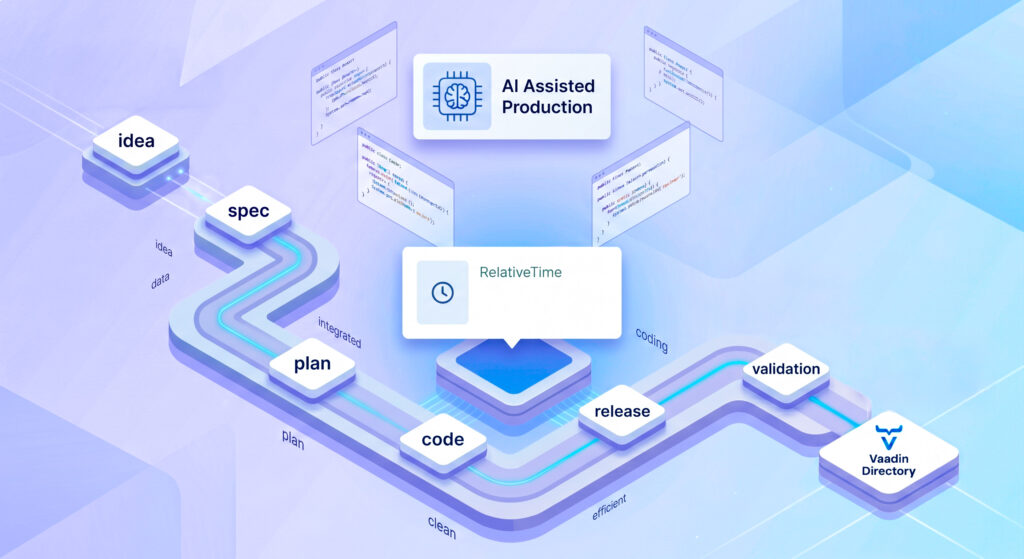
Not long ago, I shared my experience on how to migrate a legacy Vaadin application with the help of Claude AI. That experience proved that AI is fantastic for untangling legacy code, but it left me with a new question: What happens when we start from scratch? Recently, my team at Flowing Code proposed creating a new add-on: a Vaadin wrapper around the @github/relative-time-element component. This time, I decided to keep Claude in the loop from minute zero, not just as a code generator, but as an architectural design partner.
The result was a fully functioning component built in record time, but the real takeaway wasn’t the speed, it was the process. Here is how we went from a vague idea to a published repository, validating every step along the way.
The Spec as a Go/No-Go Decision Tool
Usually, when someone proposes an add-on, the decision to build it is based on a gut feeling of “this seems useful.” This time, we flipped the script.
Before writing a single line of code, I asked Claude to read the upstream npm package’s documentation and produce a full specification for the Java wrapper. The goal wasn’t to document finished work; it was to use the spec to decide if the component was worth building at all.
Claude generated a detailed breakdown: the attribute mapping, the necessary display enums, threshold handling, and the complete API surface.
Writing a spec with Claude’s help is an incredibly cheap way to convert a vague proposal into a fundable one. Seeing a concrete API surface and dependency footprint makes the go/no-go decision much easier.
That generated document became the SPECIFICATIONS.md file in our repository. It lives right next to the code, serving as a durable, version-controlled source of truth.
Automate the Mechanical, Keep the Human Judgment
To kick off the repository, we used our internal template for add-ons creation. Historically, adapting this starter meant 30 minutes or more of tedious manual labor: finding and replacing artifact names, updating the POM, adjusting Vaadin Directory urls and badges, updating license headers, etc.
To avoid asking Claude to manually do this via a chat prompt, I created a reusable Claude skill. This skill handles the mechanical first-pass text replacement in seconds.
However, we drew a very clear line in the sand regarding the skill’s scope:
- What we delegated: Text replacement in the
pom.xml,README.md, issue templates, and running Maven license updates. - What we kept human: Java package renaming, Lumo/Aura theme support, and writing the tests.
The skill stays narrow on purpose. We delegate the procedural drudgery to the script, but the architectural and structural decisions remain in the hands of the developer.
The Workflow: Spec → Plan → Code
Once the repository was ready, I didn’t just tell Claude: “Go build this based on the spec.” That’s a recipe for architectural drift.
Instead, we used a progressive commitment approach:
- The Spec: Defines what the component is.
- The Plan: Claude produced an ordered breakdown of the work (class structure, plumbing, enums, tests) without writing any code.
- The Code: Only after I reviewed and approved the plan did the actual implementation begin.
The plan is a floor, not a ceiling. While the generated skeleton was correct, most of the value came from iterating after the plan. For instance, we decided the wrapper would keep the last-applied Instant as the only server-side field, realizing we couldn’t read the rendered string back from the DOM since it lives entirely in the browser.
The Real Value of a Wrapper: Failing Fast
You might think wrapping a Web Component is just passing variables from Java to HTML. But when we cross-checked Claude’s generated Java API against the actual TypeScript source code of @github/relative-time-element (not just the README), we found a critical architectural angle.
The upstream browser component is highly forgiving: if you pass it a bad timezone offset or a negative duration threshold, it silently swallows the error or mis-renders without warning.
That is where a Java add-on proves its worth. We tasked our component with converting those silent client-side failures into loud server-side exceptions:
- We validate timezones strictly against
ZoneId.getAvailableZoneIds(). - We reject negative
Durationthresholds by throwing anIllegalArgumentException. - We validate the date-part styles before they ever reach the DOM.
The main value of a typed Java wrapper isn’t just auto-completion in the IDE; it’s failing fast. By catching what the browser silently swallows, the wrapper saves developers hours of debugging.
Compatibility and the Dual-Theme Tax (Vaadin 24 & 25)
As Vaadin 25 includes the new Aura theme we made the decision that our add-ons should support both Lumo and Aura themes if they are Vaadin 25 compatible.
The Relative Time component itself is just inline text and requires no theme-specific CSS. Therefore, the theming work relied strictly on updating the demo so it could showcase the component properly. In hindsight, the demo’s environmental constraints should have been explicit in the specs. Because they weren’t, the generated code relied entirely on hardcoded Lumo tokens, forcing a rework with Claude to implement a robust fallback chain supporting Lumo, Aura, and the Base theme, exactly as our online demo expects.
Conclusion
Building this add-on with Claude in the loop was a revelation. It allowed us to move incredibly fast, but with a level of rigor that actually exceeded our standard baseline.
My main takeaways from this build are:
- Use AI to decide, not just to execute: Generating a spec first saves you from sinking time into dead-end projects.
- Read the source, not the README: A thin wrapper still demands deep knowledge of the underlying component. The AI assists you, but adversarial code review against the source is vital.
- Humans have the final say: AI proposes, humans refine.
Having Claude build this add-on gave me the leverage to act as the architect, allowing me to plan, iterate, and validate at unprecedented speed. If you are starting a new Vaadin component, adopting a methodical Spec → Plan → Code AI workflow is definitely worth exploring.
The result of all this process is now live. If you want to try it out in your projects, the RelativeTime add-on is now available on the Vaadin Directory and is fully compatible with both Vaadin 24 and Vaadin 25. You can also play around with the live demo. I hope you find it as useful to implement as we did to build!
Thanks for reading, and let’s keep the code flowing!




Join the conversation!